<?xml version="1.0"?>
<!DOCTYPE html    PUBLIC "-//W3C//DTD XHTML 1.1 plus MathML 2.0//EN"
           "http://www.w3.org/Math/DTD/mathml2/xhtml-math11-f.dtd">
<html xmlns="http://www.w3.org/1999/xhtml">
<head>
<meta name="GENERATOR" content="TtM 3.70" />
 <style type="text/css">
 div.p { margin-top: 7pt; }
 span.roman {font-family: serif; font-style: normal; font-weight: normal;} 
</style>


<title> Lab 2: solutions </title>
</head>
<body>
 
<h1 align="center">Lab 2: solutions </h1>

<h3 align="center">&#169; 2005 Ben Bolker </h3>

<div class="p"><!----></div>
  <b>Exercise 1</b>: nothing to do

<div class="p"><!----></div>
<b>Exercise 2</b>:

<div class="p"><!----></div>
Re-create the data frame to play with:

<div class="p"><!----></div>
   <font color="#FF0000">
<pre>
&#62;&nbsp;loc&nbsp;=&nbsp;factor(rep(LETTERS[1:3],&nbsp;2))
&#62;&nbsp;day&nbsp;=&nbsp;factor(rep(1:2,&nbsp;each&nbsp;=&nbsp;3))
&#62;&nbsp;set.seed(1001)
&#62;&nbsp;val&nbsp;=&nbsp;round(runif(6),&nbsp;3)
&#62;&nbsp;d&nbsp;=&nbsp;data.frame(loc,&nbsp;day,&nbsp;val)
&#62;&nbsp;d
&nbsp;
</pre> </font>
  <font color="#0000FF">
<pre>
&nbsp;&nbsp;loc&nbsp;day&nbsp;&nbsp;&nbsp;val
1&nbsp;&nbsp;&nbsp;A&nbsp;&nbsp;&nbsp;1&nbsp;0.986
2&nbsp;&nbsp;&nbsp;B&nbsp;&nbsp;&nbsp;1&nbsp;0.413
3&nbsp;&nbsp;&nbsp;C&nbsp;&nbsp;&nbsp;1&nbsp;0.430
4&nbsp;&nbsp;&nbsp;A&nbsp;&nbsp;&nbsp;2&nbsp;0.419
5&nbsp;&nbsp;&nbsp;B&nbsp;&nbsp;&nbsp;2&nbsp;0.427
6&nbsp;&nbsp;&nbsp;C&nbsp;&nbsp;&nbsp;2&nbsp;0.888

&nbsp;
</pre> </font>

<div class="p"><!----></div>
Separate data with one row for each
location and one column for each day:

<div class="p"><!----></div>
  <font color="#FF0000">
<pre>
&#62;&nbsp;unstack(d,&nbsp;val&nbsp;~&nbsp;day)
&nbsp;
</pre> </font>
  <font color="#0000FF">
<pre>
&nbsp;&nbsp;&nbsp;&nbsp;&nbsp;X1&nbsp;&nbsp;&nbsp;&nbsp;X2
1&nbsp;0.986&nbsp;0.419
2&nbsp;0.413&nbsp;0.427
3&nbsp;0.430&nbsp;0.888

&nbsp;
</pre> </font>

<div class="p"><!----></div>
Because  R&nbsp;doesn't allow numbers
alone as column names, it puts
an <tt>X</tt> in front of the values
of <tt>day</tt> to get the column
names <tt>X1</tt> and <tt>X2</tt>.

<div class="p"><!----></div>
Separate data with one row for each
day and one column for each location:

<div class="p"><!----></div>
  <font color="#FF0000">
<pre>
&#62;&nbsp;unstack(d,&nbsp;val&nbsp;~&nbsp;loc)
&nbsp;
</pre> </font>
  <font color="#0000FF">
<pre>
&nbsp;&nbsp;&nbsp;&nbsp;&nbsp;&nbsp;A&nbsp;&nbsp;&nbsp;&nbsp;&nbsp;B&nbsp;&nbsp;&nbsp;&nbsp;&nbsp;C
1&nbsp;0.986&nbsp;0.413&nbsp;0.430
2&nbsp;0.419&nbsp;0.427&nbsp;0.888

&nbsp;
</pre> </font>

<div class="p"><!----></div>
While less complicated than <tt>reshape()</tt>,
<tt>stack()</tt> and <tt>unstack()</tt> don't
preserve information very well: for example,
the row names in the first example are
not set to <tt>A</tt>, <tt>B</tt>, <tt>C</tt>.

<div class="p"><!----></div>
<b>Exercise 3</b>:

<div class="p"><!----></div>
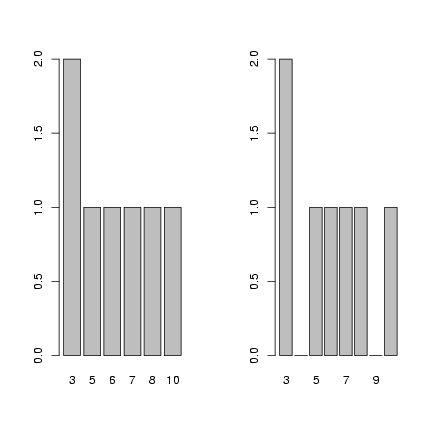
Use <tt>levels=3:10</tt> to make sure that all values
between 3 and 10, even those not represented in
the data set, are included in the factor definition
and thus appear as zeros rather than being skipped
when you plot the factor.

<div class="p"><!----></div>
   <font color="#FF0000">
<pre>
&#62;&nbsp;f&nbsp;=&nbsp;factor(c(3,&nbsp;3,&nbsp;5,&nbsp;6,&nbsp;7,&nbsp;8,&nbsp;10))
&#62;&nbsp;op&nbsp;=&nbsp;par(mfrow&nbsp;=&nbsp;c(1,&nbsp;2))
&#62;&nbsp;plot(f)
&#62;&nbsp;f&nbsp;=&nbsp;factor(c(3,&nbsp;3,&nbsp;5,&nbsp;6,&nbsp;7,&nbsp;8,&nbsp;10),&nbsp;levels&nbsp;=&nbsp;3:10)
&#62;&nbsp;plot(f)
&#62;&nbsp;par(op)
&nbsp;
</pre> </font>

<div class="p"><!----></div>
<img src="lab2A-004.png" alt="lab2A-004.png" />

<div class="p"><!----></div>
<b>Exercise 4</b>:

<div class="p"><!----></div>
Read in and recreate the seed predation data
and table:

<div class="p"><!----></div>
  <font color="#FF0000">
<pre>
&#62;&nbsp;data&nbsp;=&nbsp;read.table("seedpred.dat",&nbsp;header&nbsp;=&nbsp;TRUE)
&#62;&nbsp;data$available&nbsp;=&nbsp;data$remaining&nbsp;+&nbsp;data$taken
&#62;&nbsp;t1&nbsp;=&nbsp;table(data$available,&nbsp;data$taken)
&#62;&nbsp;v&nbsp;=&nbsp;as.numeric(log10(1&nbsp;+&nbsp;t1))
&#62;&nbsp;r&nbsp;=&nbsp;row(t1)
&#62;&nbsp;c&nbsp;=&nbsp;col(t1)
&nbsp;
</pre> </font>

<div class="p"><!----></div>
Create versions of the variables that are
sorted in order of increasing values
of <tt>v</tt> (<tt>v_sorted=sort(v)</tt> would
have the same effect as the first line):

<div class="p"><!----></div>
  <font color="#FF0000">
<pre>
&#62;&nbsp;v_sorted&nbsp;=&nbsp;v[order(v)]
&#62;&nbsp;r_sorted&nbsp;=&nbsp;r[order(v)]
&#62;&nbsp;c_sorted&nbsp;=&nbsp;c[order(v)]
&nbsp;
</pre> </font>

<div class="p"><!----></div>
Draw the plots:

<div class="p"><!----></div>
  <font color="#FF0000">
<pre>
&#62;&nbsp;op&nbsp;=&nbsp;par(mfrow&nbsp;=&nbsp;c(2,&nbsp;2),&nbsp;mgp&nbsp;=&nbsp;c(2,&nbsp;1,&nbsp;0),&nbsp;mar&nbsp;=&nbsp;c(4.2,&nbsp;3,&nbsp;1,&nbsp;
+&nbsp;&nbsp;&nbsp;&nbsp;&nbsp;1))
&#62;&nbsp;plot(sort(v))
&#62;&nbsp;plot(v,&nbsp;col&nbsp;=&nbsp;r,&nbsp;pch&nbsp;=&nbsp;c)
&#62;&nbsp;plot(v_sorted,&nbsp;col&nbsp;=&nbsp;r_sorted,&nbsp;pch&nbsp;=&nbsp;c_sorted)
&#62;&nbsp;legend(0,&nbsp;2.8,&nbsp;pch&nbsp;=&nbsp;1,&nbsp;col&nbsp;=&nbsp;1:5,&nbsp;legend&nbsp;=&nbsp;1:5)
&#62;&nbsp;legend(6,&nbsp;2.8,&nbsp;pch&nbsp;=&nbsp;1:6,&nbsp;col&nbsp;=&nbsp;1,&nbsp;legend&nbsp;=&nbsp;0:5)
&#62;&nbsp;text(0,&nbsp;3,&nbsp;"available",&nbsp;adj&nbsp;=&nbsp;0)
&#62;&nbsp;text(8,&nbsp;3,&nbsp;"taken",&nbsp;adj&nbsp;=&nbsp;0)
&#62;&nbsp;par(op)
&nbsp;
</pre> </font>

<div class="p"><!----></div>
<img src="lab2A-007.png" alt="lab2A-007.png" />

<div class="p"><!----></div>
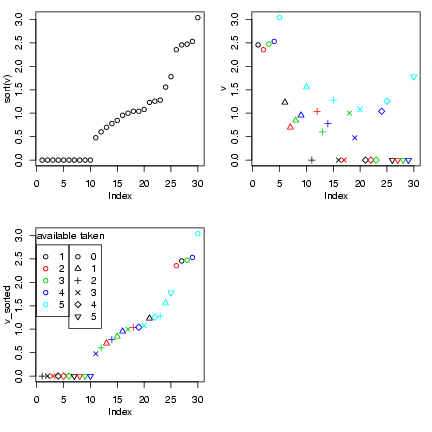
The first plot shows the sorted data;
the second plot shows the data coded
by color, and the third shows the
data sorted and coded (thanks to Ian
and Jeff for the idea of the legends).
I tweaked the margins and label spacing
slightly with <tt>mgp</tt> and <tt>mar</tt>
in the <tt>par()</tt> command.

<div class="p"><!----></div>
In fact, this plot probably <em>doesn't</em>
give a lot of insights that aren't better
conveyed by the barplots or the bubble plot ...

<div class="p"><!----></div>
<b>Exercise 5</b>:

<div class="p"><!----></div>
Read in the data (again), take the
subset with 5 seeds available,
and generate the table
of (number taken) 
<math xmlns="http://www.w3.org/1998/Math/MathML">
<mrow><mo>&times;</mo></mrow></math> (Species):

<div class="p"><!----></div>
  <font color="#FF0000">
<pre>
&#62;&nbsp;data&nbsp;=&nbsp;read.table("seedpred.dat",&nbsp;header&nbsp;=&nbsp;TRUE)
&#62;&nbsp;data2&nbsp;=&nbsp;data
&#62;&nbsp;data2$available&nbsp;=&nbsp;data2$remaining&nbsp;+&nbsp;data2$taken
&#62;&nbsp;data2&nbsp;=&nbsp;data2[data2$available&nbsp;==&nbsp;5,&nbsp;]
&#62;&nbsp;t1&nbsp;=&nbsp;table(data2$taken,&nbsp;data2$Species)
&nbsp;
</pre> </font>

<div class="p"><!----></div>
Draw the plots:

<div class="p"><!----></div>
  <font color="#FF0000">
<pre>
&#62;&nbsp;op&nbsp;=&nbsp;par(mfrow&nbsp;=&nbsp;c(2,&nbsp;1),&nbsp;mgp&nbsp;=&nbsp;c(2.5,&nbsp;1,&nbsp;0),&nbsp;mar&nbsp;=&nbsp;c(4.1,&nbsp;3.5,&nbsp;
+&nbsp;&nbsp;&nbsp;&nbsp;&nbsp;1.1,&nbsp;1.1))
&#62;&nbsp;logt1&nbsp;=&nbsp;log10(1&nbsp;+&nbsp;t1)
&#62;&nbsp;barplot(logt1,&nbsp;beside&nbsp;=&nbsp;TRUE,&nbsp;ylab&nbsp;=&nbsp;"log10(1+taken)")
&#62;&nbsp;library(gplots)
&nbsp;
</pre> </font>
  <font color="#0000FF">
<pre>
Loading&nbsp;required&nbsp;package:&nbsp;gdata
Loading&nbsp;required&nbsp;package:&nbsp;gtools

Attaching&nbsp;package:&nbsp;'gplots'


	The&nbsp;following&nbsp;object(s)&nbsp;are&nbsp;masked&nbsp;from&nbsp;package:stats&nbsp;:

	&nbsp;lowess&nbsp;
&nbsp;
</pre> </font>
  <font color="#FF0000">
<pre>
&#62;&nbsp;barplot2(t1&nbsp;+&nbsp;1,&nbsp;beside&nbsp;=&nbsp;TRUE,&nbsp;log&nbsp;=&nbsp;"y",&nbsp;ylab&nbsp;=&nbsp;"taken+1")
&#62;&nbsp;par(op)
&nbsp;
</pre> </font>

<div class="p"><!----></div>
<img src="lab2A-009.png" alt="lab2A-009.png" />

<div class="p"><!----></div>
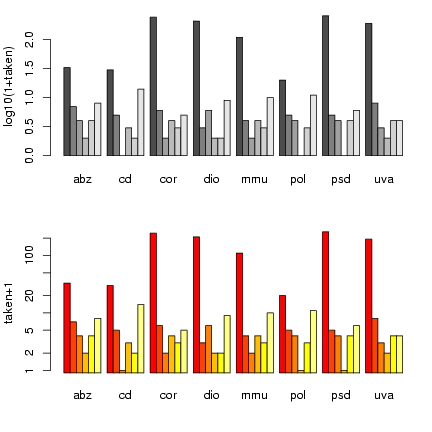
Once again, I'm using <tt>par()</tt> to tweak graphics
options and squeeze the plots a little closer together.
<tt>barplot2()</tt> has a <tt>log</tt> option that
lets us plot the values on a logarithmic scale
rather than converting to logs - but it hiccups
if we have 0 values, so we still have to plot
<tt>t1+1</tt>.  (<tt>barplot2()</tt> also uses
different default bar colors.)

<div class="p"><!----></div>
<b>Exercise 6</b>:

<div class="p"><!----></div>
Read in the measles data again:

<div class="p"><!----></div>
   <font color="#FF0000">
<pre>
&#62;&nbsp;data&nbsp;=&nbsp;read.table("ewcitmeas.dat",&nbsp;header&nbsp;=&nbsp;TRUE,&nbsp;na.strings&nbsp;=&nbsp;"*")
&nbsp;
</pre> </font>

<div class="p"><!----></div>
Separate out the
incidence data (columns 4 through 10), find
the minima and maxima by column, and compute the
range:

<div class="p"><!----></div>
  <font color="#FF0000">
<pre>
&#62;&nbsp;incidence&nbsp;=&nbsp;data[,&nbsp;4:10]
&#62;&nbsp;imin&nbsp;=&nbsp;apply(incidence,&nbsp;2,&nbsp;min,&nbsp;na.rm&nbsp;=&nbsp;TRUE)
&#62;&nbsp;imax&nbsp;=&nbsp;apply(incidence,&nbsp;2,&nbsp;max,&nbsp;na.rm&nbsp;=&nbsp;TRUE)
&#62;&nbsp;irange&nbsp;=&nbsp;imax&nbsp;-&nbsp;imin
&nbsp;
</pre> </font>

<div class="p"><!----></div>
Another way to get the range: apply the
<tt>range()</tt> command, which will return
a matrix where the first row is the minima
and the second row - then subtract:

<div class="p"><!----></div>
  <font color="#FF0000">
<pre>
&#62;&nbsp;iranges&nbsp;=&nbsp;apply(incidence,&nbsp;2,&nbsp;range,&nbsp;na.rm&nbsp;=&nbsp;TRUE)
&#62;&nbsp;iranges
&nbsp;
</pre> </font>
  <font color="#0000FF">
<pre>
&nbsp;&nbsp;&nbsp;&nbsp;&nbsp;London&nbsp;Bristol&nbsp;Liverpool&nbsp;Manchester&nbsp;Newcastle&nbsp;Birmingham&nbsp;Sheffield
[1,]&nbsp;&nbsp;&nbsp;&nbsp;&nbsp;&nbsp;1&nbsp;&nbsp;&nbsp;&nbsp;&nbsp;&nbsp;&nbsp;0&nbsp;&nbsp;&nbsp;&nbsp;&nbsp;&nbsp;&nbsp;&nbsp;&nbsp;0&nbsp;&nbsp;&nbsp;&nbsp;&nbsp;&nbsp;&nbsp;&nbsp;&nbsp;&nbsp;0&nbsp;&nbsp;&nbsp;&nbsp;&nbsp;&nbsp;&nbsp;&nbsp;&nbsp;0&nbsp;&nbsp;&nbsp;&nbsp;&nbsp;&nbsp;&nbsp;&nbsp;&nbsp;&nbsp;0&nbsp;&nbsp;&nbsp;&nbsp;&nbsp;&nbsp;&nbsp;&nbsp;&nbsp;0
[2,]&nbsp;&nbsp;&nbsp;5464&nbsp;&nbsp;&nbsp;&nbsp;&nbsp;835&nbsp;&nbsp;&nbsp;&nbsp;&nbsp;&nbsp;&nbsp;813&nbsp;&nbsp;&nbsp;&nbsp;&nbsp;&nbsp;&nbsp;&nbsp;894&nbsp;&nbsp;&nbsp;&nbsp;&nbsp;&nbsp;&nbsp;616&nbsp;&nbsp;&nbsp;&nbsp;&nbsp;&nbsp;&nbsp;2336&nbsp;&nbsp;&nbsp;&nbsp;&nbsp;&nbsp;&nbsp;804

&nbsp;
</pre> </font>
  <font color="#FF0000">
<pre>
&#62;&nbsp;irange&nbsp;=&nbsp;iranges[2,&nbsp;]&nbsp;-&nbsp;iranges[1,&nbsp;]
&nbsp;
</pre> </font>

<div class="p"><!----></div>
Or you could define a function that computes the difference:

<div class="p"><!----></div>
  <font color="#FF0000">
<pre>
&#62;&nbsp;rangediff&nbsp;=&nbsp;function(x)&nbsp;{
+&nbsp;&nbsp;&nbsp;&nbsp;&nbsp;diff(range(x,&nbsp;na.rm&nbsp;=&nbsp;TRUE))
+&nbsp;}
&#62;&nbsp;irange&nbsp;=&nbsp;apply(incidence,&nbsp;2,&nbsp;rangediff)
&nbsp;
</pre> </font>

<div class="p"><!----></div>
Now use <tt>scale()</tt> to subtract the minimum and
divide by the range:

<div class="p"><!----></div>
  <font color="#FF0000">
<pre>
&#62;&nbsp;scaled_incidence&nbsp;=&nbsp;scale(incidence,&nbsp;center&nbsp;=&nbsp;imin,&nbsp;scale&nbsp;=&nbsp;irange)
&nbsp;
</pre> </font>

<div class="p"><!----></div>
Checking:

<div class="p"><!----></div>
  <font color="#FF0000">
<pre>
&#62;&nbsp;summary(scaled_incidence)
&nbsp;
</pre> </font>
  <font color="#0000FF">
<pre>
&nbsp;&nbsp;&nbsp;&nbsp;&nbsp;London&nbsp;&nbsp;&nbsp;&nbsp;&nbsp;&nbsp;&nbsp;&nbsp;&nbsp;&nbsp;&nbsp;Bristol&nbsp;&nbsp;&nbsp;&nbsp;&nbsp;&nbsp;&nbsp;&nbsp;&nbsp;&nbsp;Liverpool&nbsp;&nbsp;&nbsp;&nbsp;&nbsp;&nbsp;&nbsp;&nbsp;&nbsp;Manchester&nbsp;&nbsp;&nbsp;&nbsp;&nbsp;
&nbsp;Min.&nbsp;&nbsp;&nbsp;:0.00000&nbsp;&nbsp;&nbsp;Min.&nbsp;&nbsp;&nbsp;:0.00000&nbsp;&nbsp;&nbsp;Min.&nbsp;&nbsp;&nbsp;:0.00000&nbsp;&nbsp;&nbsp;Min.&nbsp;&nbsp;&nbsp;:0.00000&nbsp;&nbsp;
&nbsp;1st&nbsp;Qu.:0.01501&nbsp;&nbsp;&nbsp;1st&nbsp;Qu.:0.00479&nbsp;&nbsp;&nbsp;1st&nbsp;Qu.:0.01968&nbsp;&nbsp;&nbsp;1st&nbsp;Qu.:0.01119&nbsp;&nbsp;
&nbsp;Median&nbsp;:0.03496&nbsp;&nbsp;&nbsp;Median&nbsp;:0.01557&nbsp;&nbsp;&nbsp;Median&nbsp;:0.05904&nbsp;&nbsp;&nbsp;Median&nbsp;:0.03244&nbsp;&nbsp;
&nbsp;Mean&nbsp;&nbsp;&nbsp;:0.07665&nbsp;&nbsp;&nbsp;Mean&nbsp;&nbsp;&nbsp;:0.05710&nbsp;&nbsp;&nbsp;Mean&nbsp;&nbsp;&nbsp;:0.11312&nbsp;&nbsp;&nbsp;Mean&nbsp;&nbsp;&nbsp;:0.08352&nbsp;&nbsp;
&nbsp;3rd&nbsp;Qu.:0.08915&nbsp;&nbsp;&nbsp;3rd&nbsp;Qu.:0.04551&nbsp;&nbsp;&nbsp;3rd&nbsp;Qu.:0.16697&nbsp;&nbsp;&nbsp;3rd&nbsp;Qu.:0.09172&nbsp;&nbsp;
&nbsp;Max.&nbsp;&nbsp;&nbsp;:1.00000&nbsp;&nbsp;&nbsp;Max.&nbsp;&nbsp;&nbsp;:1.00000&nbsp;&nbsp;&nbsp;Max.&nbsp;&nbsp;&nbsp;:1.00000&nbsp;&nbsp;&nbsp;Max.&nbsp;&nbsp;&nbsp;:1.00000&nbsp;&nbsp;
&nbsp;NA's&nbsp;&nbsp;&nbsp;:1.00000&nbsp;&nbsp;&nbsp;NA's&nbsp;&nbsp;&nbsp;:1.00000&nbsp;&nbsp;&nbsp;NA's&nbsp;&nbsp;&nbsp;:2.00000&nbsp;&nbsp;&nbsp;&nbsp;&nbsp;&nbsp;&nbsp;&nbsp;&nbsp;&nbsp;&nbsp;&nbsp;&nbsp;&nbsp;&nbsp;&nbsp;&nbsp;&nbsp;&nbsp;&nbsp;
&nbsp;&nbsp;&nbsp;Newcastle&nbsp;&nbsp;&nbsp;&nbsp;&nbsp;&nbsp;&nbsp;&nbsp;&nbsp;Birmingham&nbsp;&nbsp;&nbsp;&nbsp;&nbsp;&nbsp;&nbsp;&nbsp;&nbsp;Sheffield&nbsp;&nbsp;&nbsp;&nbsp;&nbsp;&nbsp;&nbsp;
&nbsp;Min.&nbsp;&nbsp;&nbsp;:0.00000&nbsp;&nbsp;&nbsp;Min.&nbsp;&nbsp;&nbsp;:0.000000&nbsp;&nbsp;&nbsp;Min.&nbsp;&nbsp;&nbsp;:0.000000&nbsp;&nbsp;
&nbsp;1st&nbsp;Qu.:0.00487&nbsp;&nbsp;&nbsp;1st&nbsp;Qu.:0.006849&nbsp;&nbsp;&nbsp;1st&nbsp;Qu.:0.007463&nbsp;&nbsp;
&nbsp;Median&nbsp;:0.01299&nbsp;&nbsp;&nbsp;Median&nbsp;:0.020120&nbsp;&nbsp;&nbsp;Median&nbsp;:0.023632&nbsp;&nbsp;
&nbsp;Mean&nbsp;&nbsp;&nbsp;:0.05199&nbsp;&nbsp;&nbsp;Mean&nbsp;&nbsp;&nbsp;:0.054013&nbsp;&nbsp;&nbsp;Mean&nbsp;&nbsp;&nbsp;:0.078439&nbsp;&nbsp;
&nbsp;3rd&nbsp;Qu.:0.04383&nbsp;&nbsp;&nbsp;3rd&nbsp;Qu.:0.048587&nbsp;&nbsp;&nbsp;3rd&nbsp;Qu.:0.085821&nbsp;&nbsp;
&nbsp;Max.&nbsp;&nbsp;&nbsp;:1.00000&nbsp;&nbsp;&nbsp;Max.&nbsp;&nbsp;&nbsp;:1.000000&nbsp;&nbsp;&nbsp;Max.&nbsp;&nbsp;&nbsp;:1.000000&nbsp;&nbsp;
&nbsp;&nbsp;&nbsp;&nbsp;&nbsp;&nbsp;&nbsp;&nbsp;&nbsp;&nbsp;&nbsp;&nbsp;&nbsp;&nbsp;&nbsp;&nbsp;&nbsp;&nbsp;&nbsp;NA's&nbsp;&nbsp;&nbsp;:1.000000&nbsp;&nbsp;&nbsp;&nbsp;&nbsp;&nbsp;&nbsp;&nbsp;&nbsp;&nbsp;&nbsp;&nbsp;&nbsp;&nbsp;&nbsp;&nbsp;&nbsp;&nbsp;&nbsp;&nbsp;&nbsp;

&nbsp;
</pre> </font>
  <font color="#FF0000">
<pre>
&#62;&nbsp;apply(scaled_incidence,&nbsp;2,&nbsp;range,&nbsp;na.rm&nbsp;=&nbsp;TRUE)
&nbsp;
</pre> </font>
  <font color="#0000FF">
<pre>
&nbsp;&nbsp;&nbsp;&nbsp;&nbsp;London&nbsp;Bristol&nbsp;Liverpool&nbsp;Manchester&nbsp;Newcastle&nbsp;Birmingham&nbsp;Sheffield
[1,]&nbsp;&nbsp;&nbsp;&nbsp;&nbsp;&nbsp;0&nbsp;&nbsp;&nbsp;&nbsp;&nbsp;&nbsp;&nbsp;0&nbsp;&nbsp;&nbsp;&nbsp;&nbsp;&nbsp;&nbsp;&nbsp;&nbsp;0&nbsp;&nbsp;&nbsp;&nbsp;&nbsp;&nbsp;&nbsp;&nbsp;&nbsp;&nbsp;0&nbsp;&nbsp;&nbsp;&nbsp;&nbsp;&nbsp;&nbsp;&nbsp;&nbsp;0&nbsp;&nbsp;&nbsp;&nbsp;&nbsp;&nbsp;&nbsp;&nbsp;&nbsp;&nbsp;0&nbsp;&nbsp;&nbsp;&nbsp;&nbsp;&nbsp;&nbsp;&nbsp;&nbsp;0
[2,]&nbsp;&nbsp;&nbsp;&nbsp;&nbsp;&nbsp;1&nbsp;&nbsp;&nbsp;&nbsp;&nbsp;&nbsp;&nbsp;1&nbsp;&nbsp;&nbsp;&nbsp;&nbsp;&nbsp;&nbsp;&nbsp;&nbsp;1&nbsp;&nbsp;&nbsp;&nbsp;&nbsp;&nbsp;&nbsp;&nbsp;&nbsp;&nbsp;1&nbsp;&nbsp;&nbsp;&nbsp;&nbsp;&nbsp;&nbsp;&nbsp;&nbsp;1&nbsp;&nbsp;&nbsp;&nbsp;&nbsp;&nbsp;&nbsp;&nbsp;&nbsp;&nbsp;1&nbsp;&nbsp;&nbsp;&nbsp;&nbsp;&nbsp;&nbsp;&nbsp;&nbsp;1

&nbsp;
</pre> </font>

<div class="p"><!----></div>
<b>Exercise 7</b>:

<div class="p"><!----></div>
You first need to calculate the column means
so you can tell <tt>sweep()</tt> to subtract them
(which is what <tt>scale(x,center=TRUE,scale=FALSE)</tt>
does):

<div class="p"><!----></div>
  <font color="#FF0000">
<pre>
&#62;&nbsp;imean&nbsp;=&nbsp;colMeans(incidence,&nbsp;na.rm&nbsp;=&nbsp;TRUE)
&#62;&nbsp;scaled_incidence&nbsp;=&nbsp;sweep(incidence,&nbsp;2,&nbsp;imean,&nbsp;"-")
&nbsp;
</pre> </font>

<div class="p"><!----></div>
Check:

<div class="p"><!----></div>
  <font color="#FF0000">
<pre>
&#62;&nbsp;c1&nbsp;=&nbsp;colMeans(scaled_incidence,&nbsp;na.rm&nbsp;=&nbsp;TRUE)
&#62;&nbsp;c1
&nbsp;
</pre> </font>
  <font color="#0000FF">
<pre>
&nbsp;&nbsp;&nbsp;&nbsp;&nbsp;&nbsp;&nbsp;London&nbsp;&nbsp;&nbsp;&nbsp;&nbsp;&nbsp;&nbsp;Bristol&nbsp;&nbsp;&nbsp;&nbsp;&nbsp;Liverpool&nbsp;&nbsp;&nbsp;&nbsp;Manchester&nbsp;&nbsp;&nbsp;&nbsp;&nbsp;Newcastle&nbsp;
&nbsp;4.789583e-12&nbsp;-1.342629e-14&nbsp;&nbsp;9.693277e-13&nbsp;-9.520250e-13&nbsp;-3.216842e-13&nbsp;
&nbsp;&nbsp;&nbsp;Birmingham&nbsp;&nbsp;&nbsp;&nbsp;&nbsp;Sheffield&nbsp;
&nbsp;1.045927e-12&nbsp;-2.389592e-13&nbsp;

&nbsp;
</pre> </font>

<div class="p"><!----></div>
(these numbers are very close to zero ... but not exactly equal,
because of round-off error)

<div class="p"><!----></div>
  <font color="#FF0000">
<pre>
&#62;&nbsp;all(abs(c1)&nbsp;&lt;&nbsp;1e-11)
&nbsp;
</pre> </font>
  <font color="#0000FF">
<pre>
[1]&nbsp;TRUE

&nbsp;
</pre> </font>

<div class="p"><!----></div>
<b>Exercise 8*</b>: 
Resurrect long-format data:

<div class="p"><!----></div>
  <font color="#FF0000">
<pre>
&#62;&nbsp;date&nbsp;=&nbsp;as.Date(paste(data$year&nbsp;+&nbsp;1900,&nbsp;data$mon,&nbsp;data$day,&nbsp;sep&nbsp;=&nbsp;"/"))
&#62;&nbsp;city_names&nbsp;=&nbsp;colnames(data)[4:10]
&#62;&nbsp;data&nbsp;=&nbsp;cbind(data,&nbsp;date)
&#62;&nbsp;data_long&nbsp;=&nbsp;reshape(data,&nbsp;direction&nbsp;=&nbsp;"long",&nbsp;varying&nbsp;=&nbsp;list(city_names),&nbsp;
+&nbsp;&nbsp;&nbsp;&nbsp;&nbsp;v.name&nbsp;=&nbsp;"incidence",&nbsp;drop&nbsp;=&nbsp;c("day",&nbsp;"mon",&nbsp;"year"),&nbsp;times&nbsp;=&nbsp;factor(city_names),&nbsp;
+&nbsp;&nbsp;&nbsp;&nbsp;&nbsp;timevar&nbsp;=&nbsp;"city")
&nbsp;
</pre> </font>

<div class="p"><!----></div>
Calculate min, max, and range difference:

<div class="p"><!----></div>
  <font color="#FF0000">
<pre>
&#62;&nbsp;city_max&nbsp;=&nbsp;tapply(data_long$incidence,&nbsp;data_long$city,&nbsp;max,&nbsp;na.rm&nbsp;=&nbsp;TRUE)
&#62;&nbsp;city_min&nbsp;=&nbsp;tapply(data_long$incidence,&nbsp;data_long$city,&nbsp;min,&nbsp;na.rm&nbsp;=&nbsp;TRUE)
&#62;&nbsp;range1&nbsp;=&nbsp;city_max&nbsp;-&nbsp;city_min
&nbsp;
</pre> </font>

<div class="p"><!----></div>
   <font color="#FF0000">
<pre>
&#62;&nbsp;scdat1&nbsp;=&nbsp;data_long$incidence&nbsp;-&nbsp;city_min[data_long$city]
&#62;&nbsp;scdat&nbsp;=&nbsp;scdat1/range1[data_long$city]
&nbsp;
</pre> </font>

<div class="p"><!----></div>
Check:

<div class="p"><!----></div>
  <font color="#FF0000">
<pre>
&#62;&nbsp;tapply(scdat,&nbsp;data_long$city,&nbsp;range,&nbsp;na.rm&nbsp;=&nbsp;TRUE)
&nbsp;
</pre> </font>
  <font color="#0000FF">
<pre>
$Birmingham
[1]&nbsp;0&nbsp;1

$Bristol
[1]&nbsp;0&nbsp;1

$Liverpool
[1]&nbsp;0&nbsp;1

$London
[1]&nbsp;0&nbsp;1

$Manchester
[1]&nbsp;0&nbsp;1

$Newcastle
[1]&nbsp;0&nbsp;1

$Sheffield
[1]&nbsp;0&nbsp;1


&nbsp;
</pre> </font>

<div class="p"><!----></div>
<b>Exercise 9*</b>: 
???

<div class="p"><!----></div>

<br /><br /><hr /><small>File translated from
T<sub><font size="-1">E</font></sub>X
by <a href="http://hutchinson.belmont.ma.us/tth/">
T<sub><font size="-1">T</font></sub>M</a>,
version 3.70.<br />On 14 Sep 2005, 11:08.</small>
</body></html>